




If there is one thing that brings everyone together across the country, it is the beautiful game of football. The energy is always on a different level. From the passionate debates in local viewing centres to the excitement shared across social media, football is more than just a sport for us—it’s a major part of how we connect and share moments with friends and family.
As the FIFA World Cup 2026™ kicks off across North America, the excitement is already building up everywhere. But let’s be honest: life moves fast, and keeping up with every single goal and update can feel like a full-time job. You don’t want to be the one asking for the score long after the game is over.
The good news is that technology has made it easier than ever to stay in the loop. Google and Gemini have introduced some very useful tools to bring you right into the heart of the action, whether you’re a serious analyst or just here for the fun. From pinning live scores to your phone screen to using AI to see yourself as a pro player, here are 6 ways to experience the World Cup like a boss.
1. Get Match Updates “Sharp-Sharp” on Your Screen
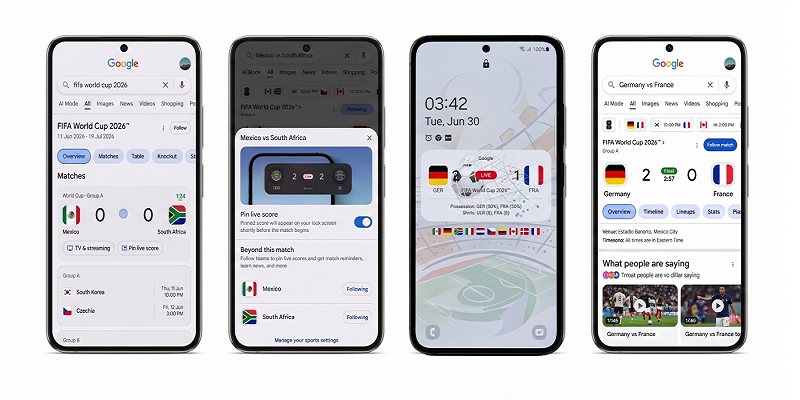
We’ve all been in that situation where we are busy with other things but dying to know the latest score. You don’t need to keep searching and refreshing heavy pages that drain your data. Now, when you search for soccer, it’s much faster to see real-time information about the game, including visuals for live scores, lineups, and current standings.
The best part is the pinning feature. You can actually pin a match’s live score directly to your Android or iOS device’s lock screen just by following that match or team. This means you can see the score at a glance without even needing to unlock your phone. You’ll even get updates before the match starts and after it ends.
2. Settle the Arguments with AI
Arguments about football rules or player stats are a huge part of the fun. Instead of going back and forth with friends, let AI Mode in Search give you the facts. You can use AI Mode for all sorts of things, from asking complex questions about specific rules to finding deep details about players and teams.
If you’re trying to understand a coach’s strategy, you can ask AI Mode to create an interactive visual for you—for instance, a breakdown of soccer formations and when a coach might use them. While these interactive features are for Pro and Ultra subscribers now, they will be free for everyone in Search by the summer.
3. Find the Perfect Place to Watch with “Ask Maps”
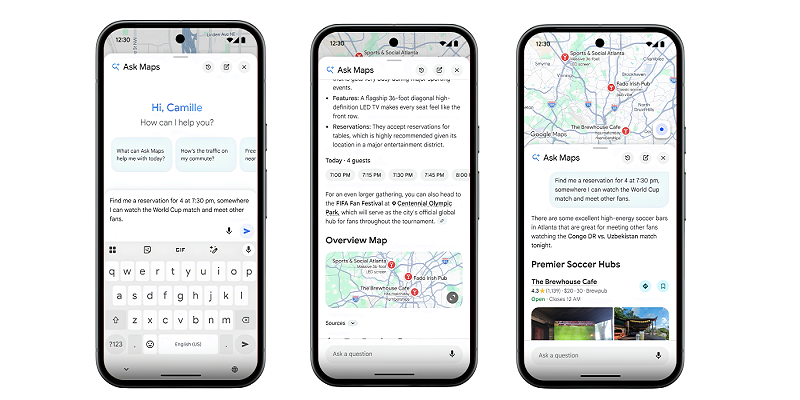
Sometimes the best way to watch a match is at a viewing party with other fans. If you’re looking for a great spot to join the fun, the Ask Maps feature is here to help. You can just type something like, “Find me a reservation for 4 at 7:30 p.m., somewhere I can watch the World Cup match and meet other fans.”
To help you get there on time, Google Maps and Waze provide the latest information on road closures and transit routes so you can navigate the games with confidence. Also, for the first time on Waze, you can see live score updates at a glance whenever your car is at a stop.
4. Catch Up on the Latest Gist Every Morning
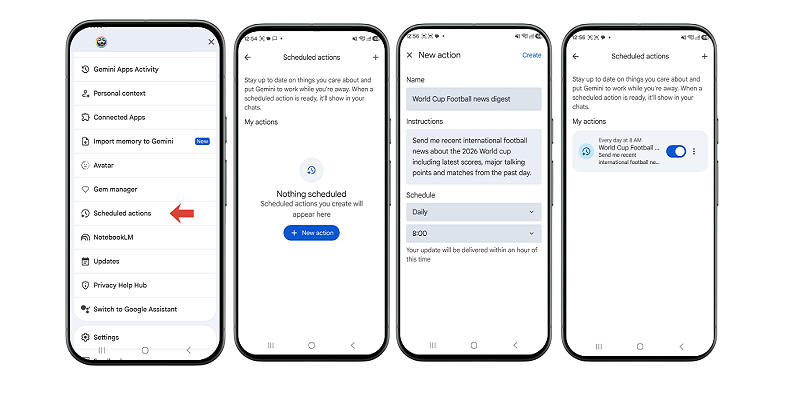
For those who can’t stay up late to watch every game, there’s a perfect way to wake up to the news. If you have a Gemini Plus, Pro, or Ultra subscription, you can use Scheduled Actions to receive a daily summary of international soccer news.
This summary is completely tailored to you. You can customize the briefing to focus only on your favorite teams and players, and choose exactly when you want it delivered.
5. Become the Star of Your Own Match Photos
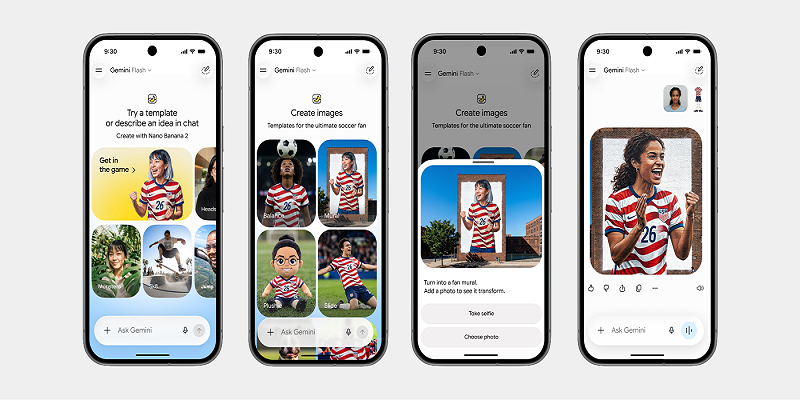
Ever wondered what you would look like as a professional football star? The new Nano Banana templates in the Gemini app let you put yourself right into the action. You just upload a photo of yourself to these custom scenes, and you can see yourself celebrating in a massive stadium or making a hero’s diving goal-line save.
The generated image will even show you wearing your country’s colors or the official jersey. These fun templates are rolling out in the “Images” tab in Gemini.
6. Get the Full Match Experience in One Place
Finally, Gemini can now act as your personal dashboard for the entire tournament. The app references live match information and news to give you the latest scores, highlights, and standings as they happen.
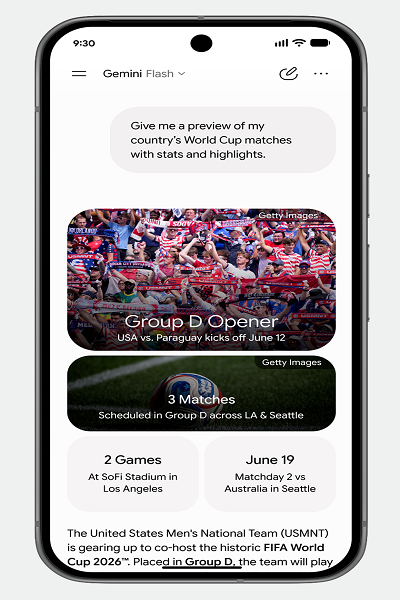
For many topics, Gemini goes beyond just text by creating visual elements like stats, images, and videos. This transforms a simple response into a dynamic “Matchday Hub” where you can see all the action at once.
The World Cup is all about sharing the excitement, and with these Google and Gemini tools, you won’t miss a beat. Whether you’re pinning live scores to your screen or seeing yourself in the official jersey, there’s a tool for every fan. Set up your updates, grab your friends, and get ready for a month of pure football magic. No stress, just vibes!
